
✦ Pet stickers from photos
Turn your pet photo into a sticker
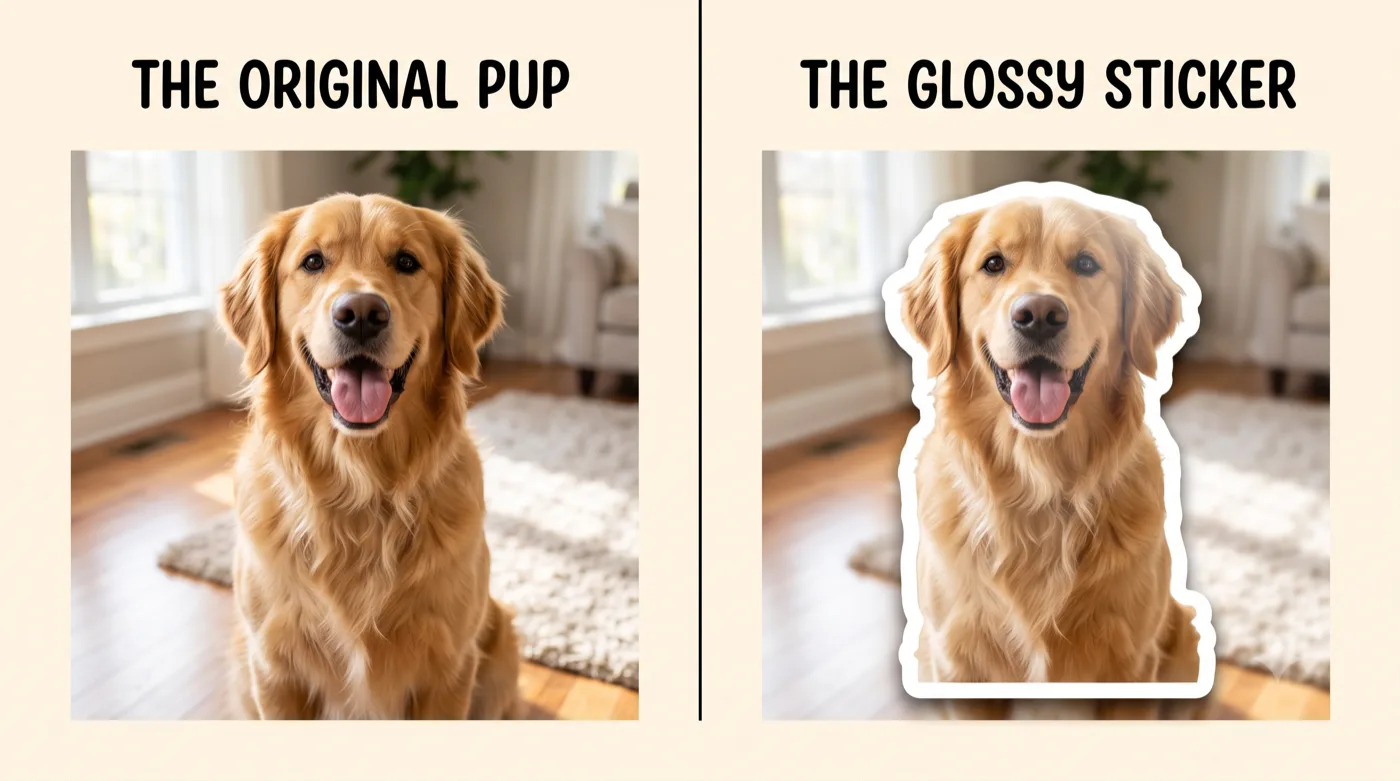
Fur, whiskers, and floppy ears are exactly where cheap background removers fall apart. Upload a photo of your dog, cat, or any pet and get a clean cutout with a consistent outline that still reads at chat size.
JPG, PNG, WebP, GIF · up to 10 MB · 2 credits per sticker with Pro
How it works
How to turn a pet photo into a sticker
- 1
Upload a clear pet photo
Drag in a well-lit shot of your dog, cat, or other pet where the fur edge stands out from whatever is behind it.
- 2
Pick a sticker style
Choose a clean cutout or a more stylized look — each one keeps your pet recognizable when the sticker is small in a chat.
- 3
Preview and download
Preview the sticker of your pet, then download a high-resolution transparent PNG for messaging or printing.
Get the best result
What pet photo works best for a sticker
For pet owners who want a sticker of their own animal — not a generic clip-art pet.
Shoot at eye level
Crouch down to your pet’s eye level so the face is the focus and the ears and snout are clearly separated from the background.
Use soft, even light
Natural window light avoids harsh shadows on dark fur, which helps the AI trace a cleaner fur edge.
Fill the frame
Get close enough that your pet fills most of the frame. More detail in the source means a sharper sticker edge.
Avoid busy backgrounds
A plain wall, floor, or couch is easier to separate than a cluttered scene with similar colors to your pet’s coat.
Download format
You get a transparent-background PNG at high resolution — ready to drop into a messaging app, a social post, or a sticker sheet for printing.
Pet sticker and pet profile picture sizes
After your pet sticker is made, one click resizes it in your browser for each app, with nothing uploaded again. These are the sizes the exporter makes; profile pictures are placed on white because several apps drop transparency. We tested every export in Chrome on 3 Nov 2026: each file came out at the size listed, and the WhatsApp file was 90 KB, under the 100 KB limit.
| Export | Size | Format |
|---|---|---|
| WhatsApp sticker | 512 × 512 WebP, ≤ 100 KB | WebP |
| Telegram sticker | 512 px PNG | PNG |
| Instagram / Threads | 320 × 320 | PNG |
| 320 × 320 | PNG | |
| X (Twitter) | 400 × 400 | PNG |
| 400 × 400 | PNG | |
| Bluesky | 400 × 400 | PNG |
| TikTok | 200 × 200 (minimum) | PNG |
| YouTube | 800 × 800 | PNG |
| 165 × 165 | PNG |
Source: WhatsApp sticker guide (GitHub) · Telegram sticker docs · Buffer: social media image sizes (May 2026)
What is a pet photo to sticker maker?
It is a tool that takes a photo of your dog, cat or other pet, redraws the animal in a sticker style, removes the background and gives it a die-cut edge. Photo to Sticker does this with AI from a single upload and gives you a transparent PNG.
Sticker styles for pet photos
- Pet Cartoon: a cute cartoon of your pet that asks the AI to keep the breed, fur colors, markings and eye color, with a thick white border.
- Watercolor: a soft hand-painted look, available for pets and people.
- The portrait and pack styles are written for human faces, so use Pet Cartoon or Watercolor for animals.
Why use an AI pet sticker maker instead of drawing one
- No drawing or editing skills needed: upload, pick a style, download.
- It starts from your own photo, so the sticker is your pet rather than generic clip art.
- The background is removed for you, including around fur and whiskers, which is the hardest part to do by hand.
Formats and limits
| Details | |
|---|---|
| Upload | JPG, PNG, WebP, GIF · up to 10 MB · 256–4096 px per side |
| You get | A PNG with a transparent background; the AI is asked for 2K resolution |
| Cost | 2 credits per sticker (from $3.90 a sticker; Pro: 100 credits a month) |
| Kept for | 6 days; your original photo is deleted 1 hour after processing |
Good to know
Pet photo to sticker FAQ
Does it work for dark or long-haired pets?
Yes, but very dark fur against a dark background is the hardest case. Good, even lighting and a background that contrasts with the fur give the AI the most to work with.
Can I make a whole pack of my pet?
Yes — upload different photos or try different styles to build a set of your pet’s expressions.
Is my pet photo kept private?
The original photo is deleted 1 hour after processing, and generated stickers are kept for 6 days so you can download them. See the FAQ on the homepage for details.
Will the sticker keep my pet’s markings?
The Pet Cartoon style asks the AI to keep the breed, fur colors, markings and eye color. Results depend on the photo; a sharp, well-lit photo gives the model the most to work with.
Is there a free version?
No. Photo to Sticker is paid only: one sticker costs $3.90 with no subscription, or Pro is $14.90 a month or $99.90 a year with 100 credits a month (50 stickers). Pro credits are valid for 30 days, pack credits for 365 days.
What can’t it do?
Stickers are static PNG images: no animated stickers, no typing your own text, and no separate cut-line files for printing. If a generation fails or is blocked by our safety check, the credits are refunded automatically; a new attempt with another photo or style costs 2 credits.
Turn your pet photo into a sticker now
Upload one clear photo, then buy a one-time pack (from $3.90 a sticker) or Pro ($14.90/month, 50 stickers a month).